Wallet Setup
Connect your Web3 wallet to AiSpace to verify your $AISPACE token holdings and unlock premium features with higher rate limits.
Why Connect Your Wallet?
By connecting your wallet, AiSpace can:
- Verify your $AISPACE token balance on the Base blockchain
- Automatically assign you to the appropriate tier
- Unlock premium features and higher rate limits
- Provide a seamless Web3 experience
Supported Wallets
AiSpace supports popular Web3 wallets including:
- MetaMask: Browser extension and mobile app
- WalletConnect: Connect via mobile wallets (Coinbase Wallet, Trust Wallet, etc.)
- Other wallets compatible with Privy authentication
How to Connect Your Wallet
Step 1: Click “Connect”
Look for the “Connect” button in the top navigation bar.
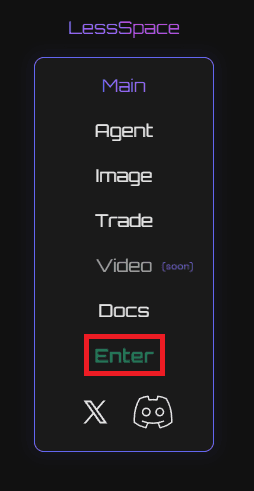
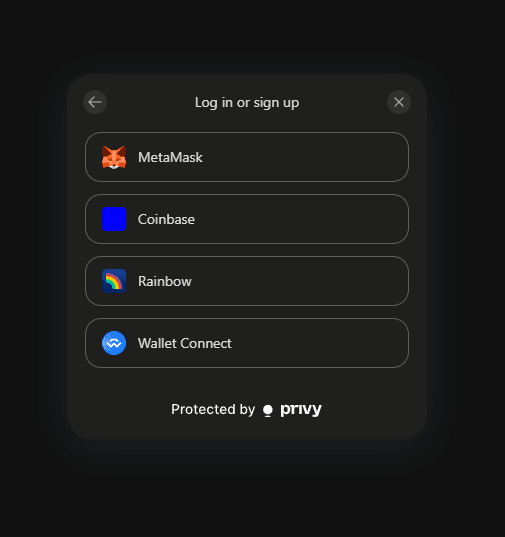
Step 2: Choose Your Wallet
Select your preferred wallet from the list of options.
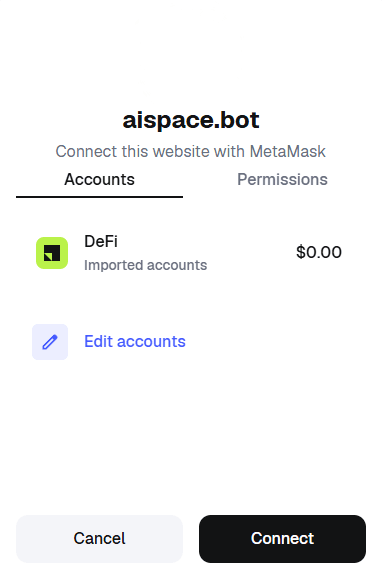
Step 3: Approve the Connection
Your wallet will prompt you to approve the connection. Review the permissions and click “Connect” or “Approve”.
Step 4: Verify Your Tier
Once connected, AiSpace will:
- Automatically check your $AISPACE token balance on Base
- Assign you to the appropriate tier
- Display your tier status and available features

Understanding Your Tier
Your tier is automatically determined by your $AISPACE token balance:
- Max (50,000,000+ tokens): 1,000 chat / 300 image / 40 video per day (plus premium quotas)
- Pro (30,000,000+ tokens): 400 chat / 120 image / 20 video per day (plus premium quotas)
- Plus (20,000,000+ tokens): 150 chat / 50 image / 10 video per day (plus premium quotas)
- Lite (10,000,000+ tokens): 50 chat / 20 image / 5 video per day (plus premium quotas)
- Free (No tokens): 10 chat / 5 image / 2 video per day (no premium models)
Learn more about tiers in our Tiers guide.
Troubleshooting Wallet Connection
Wallet Not Connecting?
- Ensure your wallet is unlocked
- Check that you’re on the Base network (or add Base if needed)
- Try refreshing the page
- Clear your browser cache
Wrong Tier Detected?
Your tier is based on your on-chain $AISPACE token balance. If you recently acquired tokens:
- Wait a few moments for the transaction to confirm
- Refresh the page
- Disconnect and reconnect your wallet
Mobile Wallet Issues?
For mobile wallets via WalletConnect:
- Ensure your mobile wallet app is open
- Check that WalletConnect connection is active
- Try scanning the QR code again
Need more help? Check our Troubleshooting guide.
Next Steps
Now that your wallet is connected:
- Understand Your Tier - See what features you’ve unlocked
- Check Rate Limits - Learn about your usage limits
- Start Using Features - Explore Main, Bots, Studio and Trade
Tip: Your tier is checked automatically when you connect. Your rate limits are based on your current tier, so holding more $AISPACE tokens unlocks better features!